Price by Member Group Fieldtype
Table of Contents
Overview
The CartThrob Price - By Member Group fieldtype allows you to create multiple prices which depend on the member group of the customer.
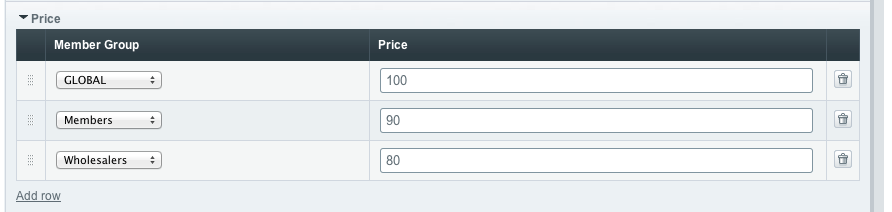
Installation
- Go to the ExpressionEngine addons » fieldtypes settings
- Select this fieldtype
- Install
- Once installed, go to your products channel(s) field groups and add a new fieldtype
- Select this fieldtype and add it to the field group
- Set this fieldtype as your "price" field type in the CartThrob »products settings
Add a this fieldtype to your Products channel
Head to Admin > Channel Administration > Channel Fields to add this fieldtype to your Products channel, or create a separate channel for these products and add it to your CartThrob product channel settings.
Variables
YOUR_FIELD
If your field is named price, you can simply output the base price of the field using standard EE variable notation:
{price}This will output a formatted number (eg. $10.00)
Variable Pair and Field Variables
You can also use the field as a variable pair to output the various price levels. The variable pair includes additional field-variables that are output between the variable pair, for example:
{your-price-field-name}
    {price}
    {member_group}
{/your-price-field-name}
member_group
The member group this price applies to
{member_group}price
The formatted price of the item including monetary prefix (eg. $10.00)
{price}price_numeric
The non-formatted price of the item, excluding prefix, and other formatting (eg. 10)
{price_numeric}price_plus_tax
The price with tax added on, including formatting (eg. $10.77)
{price_plus_tax}price_plus_tax_numeric
The price with tax added on, not including formatting (eg. 10.77)
{price_plus_tax_numeric}Examples
{member_price}
    {price}
    {price_plus_tax}
    {price_numeric}
    {price_plus_tax_numeric}
    {member_group}
{/member_price}