Packages
What are Packages?
Packages are a way of creating a bundle of products that can be sold as one product.
Installation
- Go to the ExpressionEngine addons » fieldtypes settings
- Select this fieldtype
- Install
- Once installed, go to your products channel(s) field groups and add a new fieldtype
- Select this fieldtype and add it to the field group
- Set this fieldtype as your "price" field type in the CartThrob »products settings
Add a this fieldtype to your Products channel
Head to Admin > Channel Administration > Channel Fields to add this fieldtype to your Products channel, or create a separate channel for these products and add it to your CartThrob product channel settings.
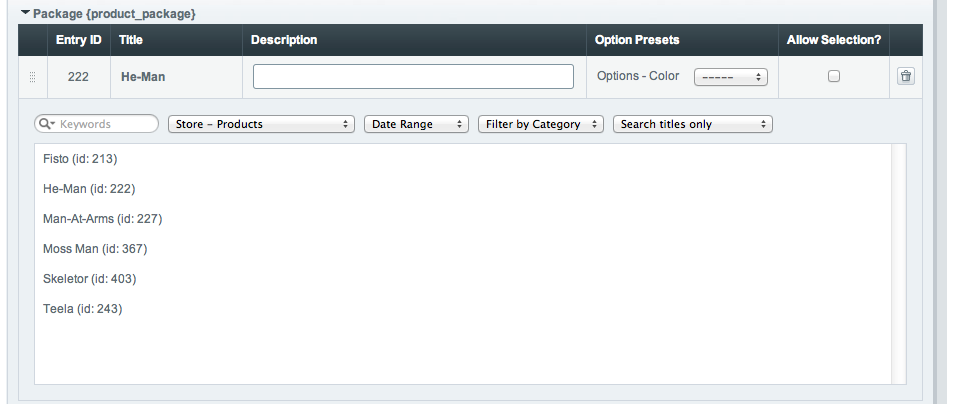
Working with the CartThrob Package interface
When creating a new entry in your Packages channel, you will see the CartThrob Package Interface. Below the table which shows which products are part of the package, you will see a filter-able list of entries from your Product channel(s). Click on a product in the list to add it to the package. Once a product is in the package list, you can set defaults for Item Options/Price Modifiers, and set whether or not the user can change this selection.
How Prices Work
If your Packages channel has a price field mapped to it AND there is a value in the price field, that will be used as the package price. If you do not have a price field mapped OR you have left the price field blank, the price will be determined by the sum of all the products in the package.
Template Tags
Package within {exp:channel:entries}
{exp:channel:entries channel="product_packages"}
    {if your_package_field_short_name}
        <ul>
        {your_package_field_short_name}
            <li>{title} {entry_id} {url_title} etc.</li>
        {/your_package_field_short_name}
        </ul>
    {/if}
{/exp:channel:entries}
Package within {exp:cartthrob:cart_items_info} & {exp:cartthrob:update_cart_form}
{exp:cartthrob:update_cart_form}
   {exp:cartthrob:cart_items_info}
        {title} {item_price} {quantity}<br />

        {package}
            {sub:title} - {sub:entry_id}<br />

            {exp:cartthrob:item_options row_id="{sub:row_id}"}
                {if allow_selection}
                    {select}
                {/if}
            {/exp:cartthrob:item_options}
        {/package}

        <input type="checkbox" value="1" name="delete[{row_id}]">

    {/exp:cartthrob:cart_items_info}

    <input type="submit" />
{/exp:cartthrob:update_cart_form}